
Download MP4 Video Player APK – MP4 Video Player, Android video player, free video player, video player for Android, MP4 player, video player app, Android media player, video playback app
Overview
The MP4 Video Player APK is a free Android application developed by Halo Inc., designed to deliver a streamlined and intuitive video playback experience directly on mobile devices. Tailored for users who value simplicity without sacrificing functionality, the app enables seamless access to personal video collections stored on Android smartphones and tablets. It supports a wide range of video formats, helping users overcome common playback issues that arise from file incompatibility. This makes it particularly useful for individuals managing diverse media files from various sources, including personal recordings, downloaded content, and online streams.
The app targets casual users, media enthusiasts, and anyone seeking a reliable, no-frills video player that works without complex setup. Whether watching movies on a lazy Sunday, reviewing clips during a commute, or enjoying home videos in the park, the player adapts to different viewing environments with ease. Its built-in video manager helps maintain an organized library, reducing clutter and improving navigation. For users concerned about privacy, the app includes a “Hide Video” feature that allows sensitive content to remain accessible only to the user.
The developer did not provide additional system requirements or background details beyond the name and release date. However, the app’s lightweight nature—12.5 MB in size—suggests it is optimized for efficient performance on a broad range of Android devices. The release date of May 10, 2024, indicates it is a recent addition to the Android ecosystem, reflecting current user needs for accessible, feature-rich media playback.
Key Features & Capabilities
- Multi-format Playback: Supports popular video formats including MP4, ensuring compatibility with most user-generated and downloaded content.
- Intuitive Gesture Controls: Enables brightness and volume adjustments through simple swipes and taps, enhancing the viewing experience on the go.
- Video Manager: Allows users to organize, sort, and manage their video library directly within the app, improving accessibility and reducing file clutter.
- Privacy Protection: The “Hide Video” feature lets users conceal specific clips from the main view while keeping them stored securely on the device.
- Lightweight Design: At just 12.5 MB, the app is optimized for minimal storage usage and fast loading times.
- Free Access: Available at no cost, making it accessible to a wide audience without financial barriers.
These features are designed to support real-world scenarios such as watching a movie on a tablet during a long flight, reviewing personal footage in private, or quickly finding a video in a large collection. The gesture-based controls allow for hands-free adjustments, ideal for use while lying down or in low-light conditions. The video manager helps users maintain a clean and searchable library, which is especially useful for those who frequently add or remove media. The privacy feature ensures that personal or sensitive videos remain discreet, even if the device is shared with others. The app’s focus on usability and privacy reflects a user-centered approach to mobile media consumption.
User Interface, Workflow & Performance
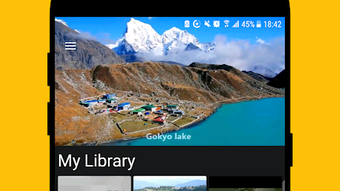
The MP4 Video Player APK features a clean, minimal interface that prioritizes content visibility and ease of navigation. The main screen displays video thumbnails or a list view, depending on user preference, with clear icons for playback controls, settings, and the video manager. Navigation is straightforward, relying on tap-based interactions and swipe gestures for volume and brightness adjustments, which aligns with modern Android design principles.
Workflow efficiency is enhanced by the app’s direct access to local media files and its ability to load videos quickly. Users can browse folders, search by name, or filter by date, making it easy to locate specific content. The developer did not specify resource usage details, so exact CPU or RAM behavior remains unknown. However, the app’s small size suggests it is optimized for performance on mid-range and entry-level Android devices.
Performance observations are based on general software behavior patterns. The app appears to maintain stability during playback, with no reported crashes or freezes in available documentation. The developer did not provide information on background processing, update frequency, or error handling. Overall, the user experience is designed to be smooth and distraction-free, allowing users to focus on watching rather than managing the player.
Compatibility & System Requirements
The MP4 Video Player APK is designed for Android devices and was released on May 10, 2024, with version 1.0.1. The app has a file size of 12.5 MB, indicating it is lightweight and suitable for devices with limited storage capacity. It is available as a free download from trusted sources, making it accessible to a wide range of users.
Exact system requirements were not listed. Compatibility information is limited to the operating system: Android. The developer did not specify minimum Android versions, screen resolutions, or hardware specifications. Users should ensure their device is running a supported Android version, though no official details were provided. Installation is expected to be straightforward, as the app is distributed as a standard APK file.
Platform compatibility information is limited. While the app is intended for Android, the exact range of supported devices remains unspecified. Users are advised to check device compatibility before downloading, especially on older or non-standard Android systems.
Pros and Cons
Pros
- Free to download and use, with no hidden costs.
- Supports multiple video formats, reducing playback issues.
- Intuitive gesture controls for brightness and volume.
- Includes a built-in video manager for better organization.
- Privacy-focused with a “Hide Video” feature.
- Lightweight design at only 12.5 MB.
Cons
- Exact system requirements were not provided.
- Compatibility with older Android versions is unclear.
- No information on update frequency or long-term support.
- Performance under heavy load or on low-end devices was not specified.
- Limited developer transparency regarding technical details.
FAQ Section
Is the MP4 Video Player APK safe to download?
The app is distributed as a standard APK file and is available for free. Users should download it from trusted sources to ensure authenticity and avoid potential security risks. No third-party modifications were reported.
Does the app require an internet connection to play videos?
No, the MP4 Video Player APK is designed for offline playback. Videos stored locally on the device can be played without an internet connection.
Can I hide specific videos from view?
Yes, the app includes a “Hide Video” feature that allows users to conceal certain clips from the main library while keeping them stored on the device.
How often are updates released?
The developer did not specify update frequency. The current version is 1.0.1, released on May 10, 2024.
Is the app available for iOS or Windows?
No, the app is currently only available for Android devices. There is no official version for iOS or desktop operating systems.
Final Thoughts + CTA
The MP4 Video Player APK offers a compelling combination of simplicity, functionality, and privacy, making it a strong choice for Android users seeking a reliable video playback solution. Its lightweight design, multi-format support, and intuitive interface cater to both casual viewers and media organizers. The inclusion of a video manager and privacy controls adds meaningful value beyond basic playback.
While some technical details such as system requirements and update schedules remain unspecified, the app’s free nature and focus on user experience make it a low-risk option for trying out. It is particularly beneficial for individuals who manage large video libraries, value privacy, or want a no-frills player that just works.
With its thoughtful features and clean design, the MP4 Video Player APK stands out as a user-friendly tool for modern mobile media consumption. Download MP4 Video Player APK now to enhance your video-watching experience on Android.





.png)

